
Education Plan
Living by Design Member Training
Education Plan
Plan Includes
- Welcome materials and password guidance
- Months 1-12 training sequence
- All TradingView, Vimeo, course, and showcase links
- Practice actions and trading-rule prompts
Document-Based Design
Complete Training Plan
Getting Started
Welcome video, welcome letter, dashboard password, and setup instructions.
Foundation Training
Beach Levels, Waves, TradingView basics, paper trading, and homework review.
Strategy Track
Value Zone, 4/20 Cross, or Commitment Cross focus during Moving Averages.
Trading Rules
Create exact rules for entries, exits, stop loss, trailing, and trade management.
Full Curriculum
Get Overview Of Plan
Getting Started
- Welcome Video from Lee
- Welcome Letter with brief instructions
TODAYS PASSWORD FOR THE TRAINING LIBRARY IS: on the members Dashboard on the website. The password changes frequently, always check the dashboard for the most up to date password.
Month 1-3 Getting Started
Lets create your FREE Tradingview account with the link below
Now that you have your Tradingview account
IMPORTANT UPDATE: WE HAVE ADDED THE LBD VZ CROSS INDICATOR STRATEGY TO YOUR INVITE ONLY INDICATORS. THIS IS A SIMPLE STRATEGY YOU CAN BEGIN TO USE WHILE YOU ARE BEGINNING TO WORK ON YOUR FOUNDATION TRAINING.
Here is the link to the LBD VZ Cross strategy showcase so you can learn to use this strategy right away.
- LBD VZ CROSS STRATEGY SHOWCASE LINK
- One of our MEMBER ONLY Telegram groups will have alerts from our strategy for you to practice entering, exiting and managing positions in your paper trading account.
THEN you will want to begin laying the BASIC foundation and beyond with the next steps laid out below.
- Beach Levels and Waves Understanding the Indicators and the strategy
- Understanding Beach Levels & Waves
- Beach Levels & Waves with Prof. Kesha
- Part 3 Understanding Beach Levels & Waves
For more Videos covering this basic strategy you can go to the
You may go to our Coaches livestreams from the website, calendar at bottom of page, however they will be more advanced AND may side track you in your education, but it will give you some examples of the strategies marked up on the charts. Please, if you choose to watch Livestream, come back to your basic training and continue to follow the steps.
- Action Steps: Take it slow, begin to mark up charts using Beach Levels and/or waves, with possible entry and exit using the position tool on tradingview chart, and post in homework telegram for review.
- How to use tradingview paper trading video
- Action Step: Demo with Paper Trading on Tradingview
- Do not move to the next course level until you are comfortable and successful with the current course level.
Month 4-6 Moving Averages
In this segment you will learn finite details in finding additional entries using Moving Averages.
- We have three MA strategies.
- Value Zone
- 4/20 (i would recommend choosing value zone or commitment cross first, 4/20 is a simple add on later)
- Commitment Cross
- You will need to pick ONE and spend your time learning that strategy.
- Below you will find a Brief overview of each strategy. Watch the short video demonstrating each one and then decide which one you would like to focus on. If you are still unsure about which one you would like to focus on, feel free to ask questions to our members in the homework chat.
Brief overview:
Value Zone – brief overview video
Commitment Cross – brief overview video
If you choose
VALUE ZONE: watch these videos
If you choose
4/20 CROSS: watch these videos
- HOW TO SET UP YOUR 4/20 INDICATORS ON THE CHART
- 4/20 STRATEGY TRAINING VIDEO
If you choose
COMMITMENT CROSS: watch these videos
- HOW TO SET UP YOUR COMMITMENT CROSS INDICATORS ON THE CHART
- Action Steps: Learn the strategy, practice in demo until consistent. Markup charts and put them in the homework telegram for feedback. Show marked up charts in homework telegram for review, Demo with Paper Trading on Tradingview
- Do not move to the next course level until you are comfortable and successful with the current course level.
Month 7 Fibonacci
📌 PLEASE DISREGARD OLDER SCHEDULES IN THESE VIDEOS – CURRENT SCHEDULE IS ON OUR WEBSITE
Video:What is Fibonacci ?
- Action Steps: Mark up charts, Show marked up charts in homework telegram for review, Demo with Paper Trading on Tradingview
Month 8 Parallel Channels
📌 PLEASE DISREGARD OLDER SCHEDULES IN THESE VIDEOS – CURRENT SCHEDULE IS ON OUR WEBSITE
- Action Steps: Show marked up charts in homework telegram for review, Demo with Paper Trading on Tradingview
- Risk Management with Coach Courtney
- Creating Trading Rules with Coach Courtney
Month 9 Intermediate Course
Month 10 Advanced Course
300 Course
Months 11-12 Putting It All Together
Trading Rules
Create these rules as if you were creating a trading bot. You have to tell the bot EXACTLY what to do!
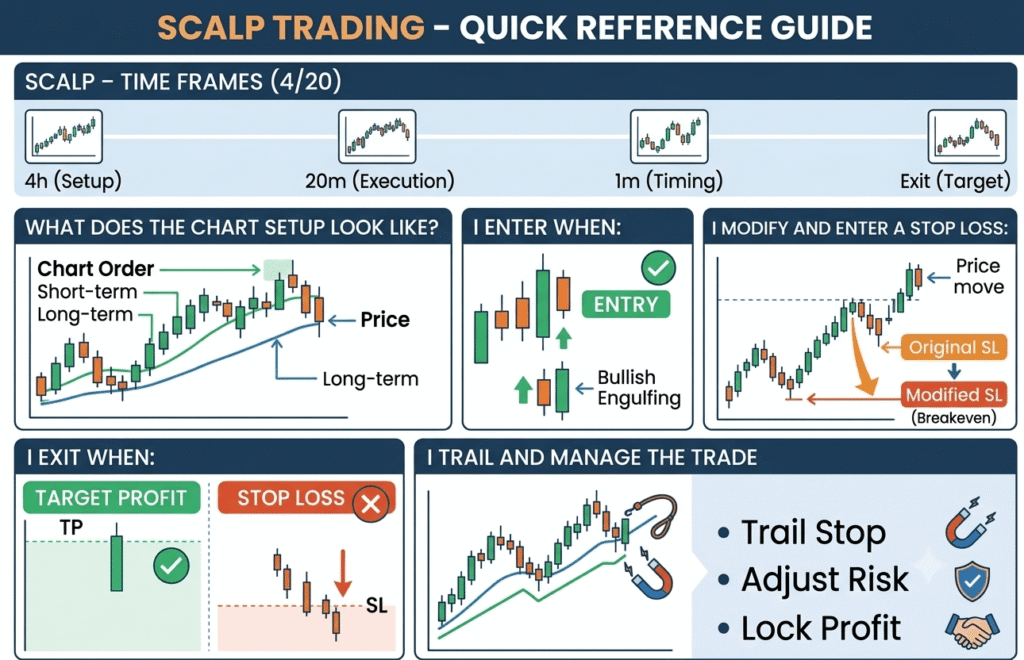
- Scalp - time frames
- 4/20
- What does the chart setup look like MA order, Price
- i enter when:
- I modify and enter a stop loss:
- I exit when:
- Tp
- Stop loss
- I trail when:
- I manage the trade when:
- Intraday / Intra scalp - time frames
- What strategy
- What does the chart setup look like MA order, Price
- i enter when:
- I modify and enter a stop loss:
- I exit when:
- Tp
- Stop loss
- I trail when:
- I manage the trade when: 40 points in profit
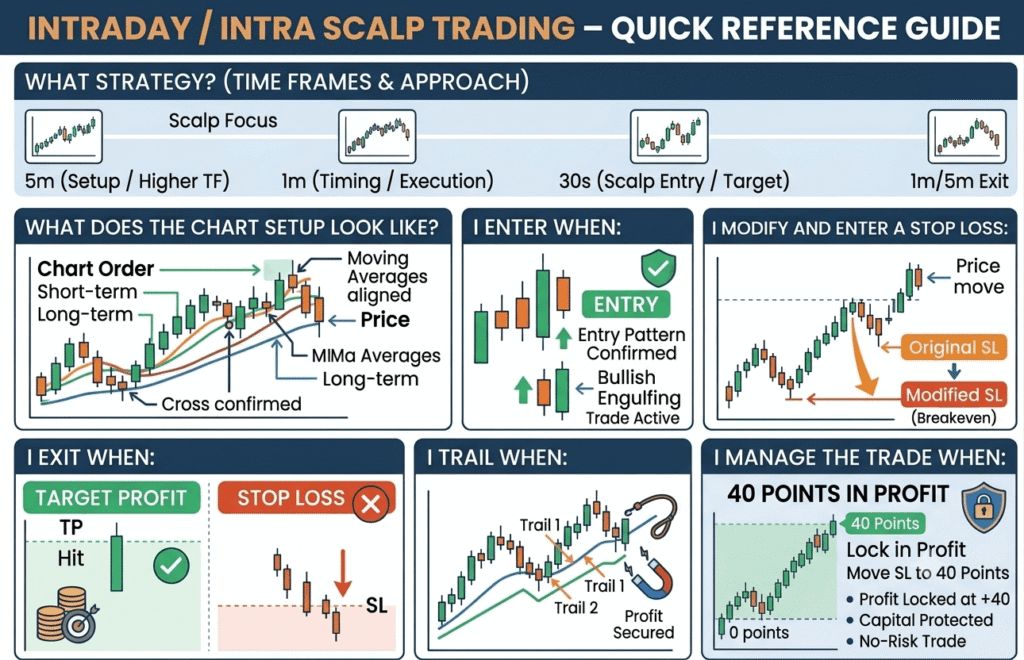
I put my stop in profit
I partial close
I add a new position